Introduction
In my opinion git’s interface is one of the most confusing things. A lot of developers I see also feel the same way. As I was slowly understanding git internals, I further get frustrated about how something which is build so simple and elegant can have such as bad interface. most developers simply remember the commands like some magic spells for this reason. I would like to talk about the mental model that I have formed to understand git. Even though I wont be going into the interface side of it, I think this can help us understand the interal elegance of the git system.
Its just a DAG!!
The entire commit history is a Directed Acyclic Graph(fancy way of saying that its a directed graph with no cycles). The commits we perform during the course of our project are just Nodes in the graph, where each commit is pointing to the previous commit. This understanding of which node is pointing to what node is important, An example would be, The current-commit is pointing to the previous-commit. This also helps us to revert back or checkout older changes
A simple diagram to illustrate the model would be:
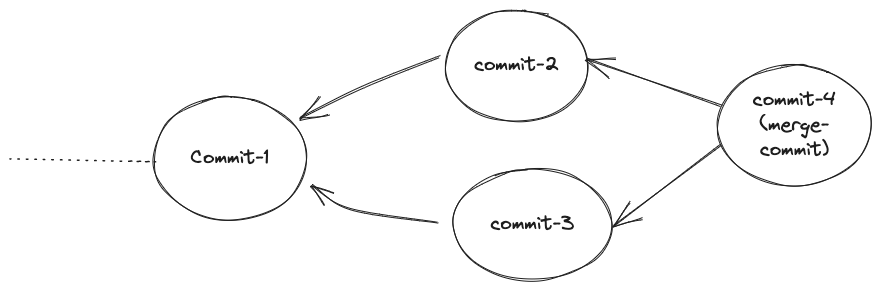
we can see that commit-2 and commit-3 both are pointing to the previous commit, and commit-4 is pointing to both commit-2 and commit-3, this is because thats a merge-commit. merge-commits are the commits that are merge two branches(more on what a “branch” is later). now that we have understand how the commit history can be viewed. Now lets move to the next part and look at the branches, HEAD and tags.
Pointers all the way down
If every commit can be understood as a graph, then how do we know where we are and how exactly do we go back to previous commits? This is where the pointers come in. Where we currently are in the commit history(the most recent commit) and where the branches are there is all pointers. Moving/Movable pointers actually. we can view them when we look at the history using git log. For example let me fetch the logs of one of my projects.
$ git log --all --graph --decorate

* commit ce2909ae966d665c2abe22b531e03e27d2214c42 (HEAD -> main, origin/main)
| Author: JaswanthP6878 \<xxxxxxxx@gmail.com\>
| Date:   Sun Nov 5 21:42:06 2023 +0530
|
|     updated ReadME
|
* commit 9d88303c9265b79a3424c7bd2acfca91e8cdc71e (add-reduce)
| Author: JaswanthP6878 \<xxxxxxxx@gmail.com\>
| Date:   Tue Oct 10 21:44:32 2023 +0530
|
|     added reduce
|
* commit 0ebdbded0a8a24b0f69a0386baf44664f5b56447 (refactor2)
| Author: JaswanthP6878 \<xxxxxxxx@gmail.com\>
| Date:   Tue Oct 10 20:54:11 2023 +0530
|
|     map completed correctly
In the above output, “main”, “add-reduce”, and “refactor2” are all branches and we can see them they are all attached to commits. They point to those specific commits. Hence we can see them as simply pointers. On the most recent commit we have “HEAD”. This is the our current location in the commit history.
Note: What about “origin/main”? it refers to the pointer of remote repository. i.e the state of the git repository hosted in github.
When we make a commit, lets say we are on main branch, then both the “main” pointer and the “HEAD” pointer move to the new commit. the commit log would change as follows:
$ git commit -am "added new commit"
...
$ git log --all --decorate --graph

* commit 3efe35205949437fa84173f30dd6549f36ffc53f (HEAD -> main)
| Author: JaswanthP6878 <xxxxxx@gmail.com>
| Date:   Tue Dec 5 22:49:27 2023 +0530
|
|     added new commit
|
* commit ce2909ae966d665c2abe22b531e03e27d2214c42 (origin/main)
| Author: JaswanthP6878 <xxxxxx@gmail.com>
| Date:   Sun Nov 5 21:42:06 2023 +0530
|
|     updated ReadME
|
* commit b6e42d9cdf5aa39aa16a1cffe22ff9a9f47ed038
| Author: JaswanthP6878 <xxxxxx@gmail.com>
| Date:   Wed Oct 11 15:57:28 2023 +0530
|
|     final touches#2
....
* commit 9d88303c9265b79a3424c7bd2acfca91e8cdc71e (add-reduce)
| Author: JaswanthP6878 <xxxxxx@gmail.com>
| Date:   Tue Oct 10 21:44:32 2023 +0530
|
|     added reduce
Hopefully this short post gave you some intuition for working with git. I for one felt reasoning the git commands has gotten better ever since I have understood this graphs-with-pointers model of git. If you want to get better at git I recommend the Pro Git.